 AI, Plainly
Issue 8 · Monday, November 23, 2026
A week of outages, Anthropic goes public, and Google's Gemini Task helper
Welcome to Issue 8. We start with the question several members have asked: what was behind last week’s string of outages, and did AI have anything to do with it? Then a financial story: Anthropic, the company behind the Claude chatbot, began selling shares to the public. We explain what that means in plain terms, and what it means for you if you just use a chatbot (not much). We also cover Google’s Gemini “Task” helper, which is now free in the United States, and a Gemini Notebook feature that turns your notes into a website. This issue’s Deep Dive explains “local AI” and asks for your opinion: should the Computer Club set up a local AI computer for members? Please take the short survey. In Member Voices, Jim Smith weighs in on caregivers and AI bill paying, and the Stay safe item is a good one to read before holiday shopping. We end with something just for fun: a Lowcountry hidden-picture puzzle made with AI.
AI SIG announcements
Next SIG meeting: Wednesday, December 2, 4:00 pm
Our next meeting is Wednesday, December 2, from 4:00 to 5:00 pm, and after that we meet on the first Wednesday of each month. Each meeting is an hour. Afterward you’re welcome to stay for optional member Q&A, up to another hour (until 6:00 pm). Meetings are virtual on Google Meet until further notice. No software or app is needed, and it works directly from a web browser.
- Join on Google Meet, or dial (US) +1 402-781-4247 and enter PIN 796 971 497#. More phone numbers.
December Show Me: getting started with ChatGPT and Gemini
Thank you to everyone who has voted on the Show Me topics for December 2. The candidate topics, suggested by members and SIG leaders, were getting started with ChatGPT, getting started with Gemini, and getting started with Gemini Notebook (formerly NotebookLM). Based on the votes so far, Ron will demonstrate getting started with ChatGPT and getting started with Gemini, with a handout for each so you can follow along at home. Gemini Notebook stays on the list for a future meeting or newsletter article. Have an idea for a future Show Me? Suggest a topic any time.
Should the club have its own AI computer? Tell us
This issue’s Deep Dive explains “local AI,” meaning AI that runs on a computer you own instead of a company’s servers. It asks whether the Computer Club should set one up for members to use. It isn’t a vote, but your answers will be helpful as club leadership considers whether the investment makes sense, so please take the 2-minute survey. It’s anonymous, and “no” or “not sure” helps just as much as “yes.”
Reminder: join the watch-and-discuss session
Last issue, Jim Smith proposed a book-club-style meeting: we’d watch I’m Not Real, a 27-minute documentary made almost entirely with AI tools, then talk it over together on Google Meet. A few members have already signed up, and we’d like a few more before we set a date. You can watch the film on YouTube to see if it interests you. To join, email SCHHCC.AI.SIG@gmail.com and say you’d like to be part of the watch-and-discuss session. Jim will follow up.
No newsletter next week
Because of the Thanksgiving holiday, there will be no newsletter next week. The next issue arrives on Monday, December 7. Happy Thanksgiving!
Have a question or an idea for a future AI SIG session? Send it to SCHHCC.AI.SIG@gmail.com.
AI news worth knowing
A week of outages: what’s known, and where AI fits
Between November 12 and 17, a string of outages hit services many of us use: Microsoft’s Outlook and Teams (nearly a day), the FAA’s nationwide flight stop (more than four hours, with about 20,000 flights canceled over the following days), Workday’s payroll service, Chase and other banks, United Airlines, a classified NSA network, and Apple’s iCloud and App Store. Most were fixed within hours. The explanations the companies have given so far share a theme: a software update, an equipment upgrade, a test or a fix that went wrong on older, interconnected systems. The FAA expects to announce the cause of the flight stop soon, and Microsoft has a final report still to come.
If your first thought was a cyberattack, coordinated or not, or that AI had a hand in it, that is not unreasonable. This many outages in a few days is very unusual, and after this summer’s reports of AI agents going off script, it’s an understandable reaction. As of now, though, no company or agency has called any of them a cyberattack. At a House hearing on Wednesday, November 18, the Secretary of Homeland Security, the Director of National Intelligence and the FBI’s deputy director said there is no evidence of one. The DHS secretary had earlier suggested on TV that advanced AI might be to blame, but offered no evidence. A connection to AI that more people are taking seriously is less direct: AI tools now find software flaws faster than ever, and organizations rushing to patch old systems can knock them offline. Sen. Mark Warner of Virginia has said he fears “a period” of outages “as companies try to patch quickly,” though he said the FAA’s problem was tied to equipment upgrades rather than AI.
Why it matters: This is no reason for alarm, but a little preparation is sensible: keep a small amount of cash and a paper list of key phone numbers at home, along with food and water for at least several days (the government’s Ready.gov suggests a gallon of water per person per day), keep updating your own devices, and don’t move your savings because of the news. Expect scam messages that use the outages as cover (“your account is locked, verify now”). Contact your bank only through the number on your card.
Sources: Security officials tell Congress tech outages are not malicious, Nextgov/FCW, Nov. 18, 2026 · Consensus mounts that tech outages were fueled by patching of AI-discovered vulnerabilities, CyberScoop, Nov. 18, 2026 · Widespread outages hit banks, air travel, the NSA and Apple, CNBC, Nov. 17, 2026 · FAA to announce root cause of outage that led ground stoppage, FOX 5, Nov. 20, 2026 · Sen. Mark Warner warns of more outages, WSLS, Nov. 20, 2026 · Build a kit, Ready.gov
Anthropic goes public in a rough week for AI stocks
On Thursday, November 19, shares of Anthropic began trading on the Nasdaq stock exchange under the symbol “ANT.” Anthropic makes Claude, one of the best-known AI chatbots. A company going public in this way is called an initial public offering, or IPO: the company sells shares to the general public for the first time, and afterward anyone can buy or sell them through a brokerage account.
Anthropic’s own announcement says it priced the shares at $83 each and offered 980 million of them. CBS News reports that the sale raised about $81.3 billion, which it calls the largest IPO in history, and that the shares closed their first day at $97.17, about 17% above the offer price, after a volatile day. The amount raised and the company’s total value are different numbers: at the $83 offering price, the whole company was valued at roughly $1.5 trillion, since the sale covered only a small slice of its shares. Friday was much rougher. Anthropic’s shares fell about 8.5% to close at $88.91, after dipping at one point to just above the $83 offering price, according to CNBC and market data.
The bigger story was the market. Anthropic’s debut came in the middle of a hard week for stocks tied to AI. For the week, the S&P 500 fell about 8.6% and the Dow about 8%, their worst weeks in years, and on Friday both closed in what Wall Street calls a “correction,” 10% or more below their record highs. The Nasdaq, home to many technology companies, fell about 10% and gave back all its gains for 2026. Chipmakers were hit hardest: Nvidia and AMD each fell more than 13% on Friday alone, and an index of chip stocks had its worst week since 2001. Most of the damage came from AI-related companies. Yahoo Finance pointed to one version of the S&P 500 that leaves out AI stocks, which was only about 5% below its record.
News reports point to several worries at once. Investors increasingly doubt that the enormous sums being poured into AI data centers and chips will pay off soon. Anthropic is one example: its filings showed a net loss of $80.7 billion for the first half of 2026, though most of that was an accounting charge rather than money spent running the business. On top of that came fears of higher interest rates, the sudden exit of Nvidia’s longtime chief executive, Jensen Huang, and reports that federal regulators are looking into Nvidia’s accounting. Prices move constantly, and this is not financial advice.
Why it matters: For someone who simply uses Claude, nothing changes: the same app, the same plans, the same prices. The bigger effect for most members is on investments. Because a few large AI-related companies now make up a big part of the overall market, their slide pulled down the broad indexes that many retirement accounts and mutual funds follow. If the week’s news has you uneasy, talk with a financial adviser rather than reacting to a single week’s headlines. Whether to buy or sell any company’s shares is a personal decision; we don’t offer advice on it.
Sources: Anthropic prices initial public offering, Anthropic, Nov. 18, 2026 · Anthropic shares gain 17% on first day of trading after record IPO, CBS News, Nov. 19, 2026 · Anthropic hits $2.1 trillion valuation in Nasdaq debut, Reuters via TimesLIVE, Nov. 19, 2026 · Anthropic falls nearly 9% in first full day of trading as tech stocks get shellacked, CNBC, Nov. 20, 2026 · Anthropic (ANT) stock price and chart, Stock Analysis · S&P 500 and Dow close in correction; Nasdaq erases 2026 gain as AI rout picks up steam, CNBC, Nov. 20, 2026 · Chips suffer worst week since 2001 as the Nasdaq nears a bear market, Yahoo Finance, Nov. 21, 2026 · Anthropic’s IPO prospectus shows $16.3 billion in revenue, an $80.7 billion net loss, Fortune, Oct. 26, 2026
Google is back in the AI race with Gemini 4 Neon
For much of the past year, it could look as if Google had lost its footing in AI. Anthropic (maker of Claude) and OpenAI (maker of ChatGPT) kept releasing new models, each a little smarter than the last, and they often topped the rankings. In the past few weeks that has changed. Since about November 10, Google has released several new Gemini models in quick succession. The newest, Gemini 4 Neon, arrived on Wednesday, November 18, and by some measures it is among the very best AI models available today.
What it is: Neon is a new “brain” behind the Gemini chatbot. Google now offers three main choices: a fast model for everyday questions, a top model for the hardest jobs, and Neon in between. Google says Neon is especially good at careful analysis, research and writing software, at close to the speed of its everyday model. An independent group that tests AI models, Artificial Analysis, ranks it near the top of its overall scores. In Google’s own comparison, it scores slightly ahead of the current top models from Anthropic and OpenAI. Each company picks its own comparisons, so treat those claims with some caution.
Where you can use it now: In the Gemini app and at gemini.google.com, Neon is available to people who pay for Google AI Pro ($19.99 a month) or Google AI Ultra. To use it, choose Deeper analysis from the model menu. It isn’t included in the free version of Gemini or the lower-priced Google AI Plus plan. Google is rolling it out gradually, so some accounts may see it later than others. Software developers and businesses can also use it through Google’s paid developer tools.
Why it matters: Nobody stays on top for long. The lead among the big AI companies keeps changing hands every few weeks, and that competition keeps pushing the free and paid chatbots most of us use to get better. If you use the free version of Gemini, you don’t need to do anything. Improvements like these tend to reach free users over time.
Sources: Introducing Gemini 4 Neon, Google, Nov. 18, 2026 · Google launches Gemini 4 Neon, live for AI Pro, 9to5Google, Nov. 18, 2026 · Gemini 4 Neon replaces Argon for Google AI Pro subscribers, Notebookcheck, Nov. 19, 2026 · Google ships Gemini 4 Neon, its fourth new Gemini model in a month, The Decoder
Ron and Jim each share which AI they use every day below in Our Take.
Google makes its Gemini Task helper free in the U.S. and a few other countries
On Tuesday, November 17, Google said that Task in its Gemini app is free to use in the United States, Canada, Australia, India, Japan and South Korea, and is rolling out. Task is an AI agent: a helper that carries out several steps for you rather than just answering a question. You describe a job, such as comparing products or finding a business, and Gemini works on it in the background. In the U.S., Google says it can also place phone calls to businesses and handle checkout using a payment method saved in Google Wallet. Elsewhere, Google says a paid plan is needed, and it isn’t available in the UK, Switzerland or the European Economic Area.
Google says Gemini is “designed to always ask” you to confirm before it sends messages, deletes data, buys something, makes a payment or submits a web form, and it calls task handling “experimental.” You need to be 18 or older, signed in with a personal Google Account (not a work or school account), with Gemini history turned on. To try it, open Gemini on the web, on a Mac, or in the phone app and choose Task (it sits below the text box on the web). Google says not to type passwords or payment details into the task conversation.
Why it matters: An agent that can shop, call and pay is acting for you, so read what it plans to do before you approve it, and don’t hand it accounts you wouldn’t want it touching. If you help someone else with their finances, see Jim Smith’s piece in Member Voices, Why Caregivers Should Think Twice Before Letting AI Pay the Bills. Ron will cover Task in his “Getting Started With Gemini” presentation and handout at the next SIG meeting on Wednesday, December 2. A fuller comparison of personal AI agents is planned as a future Deep Dive.
Sources: Manage your tasks & workflows in Gemini Apps, Google Gemini Help · Make purchases & payments with Gemini Apps, Google Gemini Help · Gemini Apps release notes, Google, Nov. 17, 2026
Gemini Notebook can now turn your notes into a website
Gemini Notebook, Google’s tool (formerly called NotebookLM) for asking questions about documents you add to it, can now build a small interactive website from what’s in a notebook. Google’s examples are a visual study guide, a data dashboard and a project tracker. Google announced it on Monday, November 16.
To try it, open a notebook that already has sources, type make me a site in the notebook chat followed by a description of what you want, and select Open in a new tab when it’s ready. You can then adjust the layout and look, and you can share the site. Google says it is rolling out on the web, worldwide, to users 18 and older, Workspace subscribers included, and that a mobile version is “coming soon.” Google’s post doesn’t mention a price or plan limits.
Sharing is the part to think about. Google’s announcement says sites can be shared but doesn’t say who can open one, and we couldn’t find a Google help page that does. Google’s help page for sharing a notebook says a link can be set so anyone with the link, signed in to a Google Account, can open it. We can’t confirm a site works the same way. Until Google says more, assume anyone with a link could see it, and don’t build a site to share from a notebook that holds personal or financial documents.
Why it matters: This is a simple way to turn a pile of notes, such as a trip plan or a family history, into something organized and easy to read. It’s also another reminder to know what you’re sharing and with whom.
Sources: Gemini Notebook can turn your sources into interactive sites, Google, Nov. 16, 2026 · Use public notebooks and featured notebooks in Gemini Notebook, Google Gemini Notebook Help
Also this week
- Anthropic’s updated usage rules now cover abusive treatment of its AI. The company’s Usage Policy, which took effect November 12, adds a ban on “sustained and needless abusive or cruel behavior toward our models.” Anthropic says it applies only to extreme cases of repeated cruelty with no discernible purpose, not to ordinary frustration, pushback, dark themes in creative writing, or testing and research, and that Claude ending the conversation remains the main way it is handled. Being short with a chatbot is fine. If the question of whether AI can feel interests you, see the documentary in Worth a look. (Anthropic, Oct. 8, 2026)
Our Take
Why I’m sticking with Claude for now
By Ron Snyder · Opinion · On: Google is back in the AI race with Gemini 4 Neon
The past few weeks have brought a burst of new top-tier AI models. Google released Gemini 4 Carbon, Hydrogen and Neon, and OpenAI, the maker of ChatGPT, released GPT-6.2 Astra and Sol. Even with all that churn, my daily driver, the AI I reach for first every day, is still Anthropic’s Claude Opus 5.5. For everyday use, I find it hits the sweet spot of intelligence and cost.
That’s my choice, not a recommendation. Today’s leading models are all very capable, and the best one for you is the one you’re most comfortable with or already paying for. There’s no need to switch every time a new model makes headlines.
Why I’m sticking with Gemini for now
By Jim Smith · Opinion · On: Google is back in the AI race with Gemini 4 Neon
I’m sticking with Google Gemini right now for two practical reasons: everyday convenience and long-term staying power. Because Gemini is built directly into the Google tools I already use and excels at search-grounded research, long documents, and working with images and video, it handles almost everything I need without forcing me to juggle multiple subscriptions or constantly chase whichever model topped a benchmark this week. Google is backed by a deeply profitable core business that generated over $40 billion in operating profit last quarter alone, which is quite the opposite of Anthropic and OpenAI’s business models. For me, sticking with a capable, well-integrated tool from a company that isn’t going anywhere is what works best.
Deep Dive: Local AI: Should the Computer Club Have Its Own AI Computer?
When you use ChatGPT, Gemini or Claude, your question, and any documents or photos you add, travel over the internet to the company’s computers, and the answer comes back to your screen. Local AI is different: the AI runs on the computer in front of you, and nothing you type or add is sent to a company.
An idea raised at our first SIG meeting is now being discussed with the Computer Club’s leaders: one computer in the computer room that runs local AI for members to use. It would cost about $6,000, and nothing has been decided. This week’s Deep Dive explains the idea in plain terms:
- What’s good about it: privacy, no account or sign-up, no subscription or usage limits, and a hands-on way to learn how AI works.
- What’s not so good: answers are a step behind the best paid services, it doesn’t know current events, you would have to come to the computer room, and it is a large purchase for the club.
- What members could do with it: make sense of a medical bill, summarize a private document, draft a letter, or try AI for the first time without creating an account.
- A bigger project: build a personal digital archive entirely at the club. Scan a shoebox of family photos and important papers on the club’s scanners, let the AI computer describe and organize them, and take home a backed-up archive that keeps them safe and easy for your family to find and share.
Whether it’s worth the cost depends on whether members would use it, so we’re asking. The survey takes about two minutes and is anonymous. “No” and “not sure” are just as helpful as “yes.”
Read the full article · Take the 2-minute survey
Member Voices
Why Caregivers Should Think Twice Before Letting AI Pay the Bills
By Jim Smith · Opinion
Having cared for my wife when she was dying several years ago, I know how difficult and time-consuming caregiving can be. In that situation, we long for anything that might make life easier. Caring for an aging spouse or parent brings a flood of prescriptions, hospital statements, and insurance paperwork, on top of all the other bills that arrive every month. For exhausted retirees and family caregivers, it can be tempting to hand banking and bill payments over to an AI agent, the kind of assistant that can act on your behalf, such as Meta’s new Muse. I would have welcomed that myself had it been available at the time.
But there are reasons to be careful, as caregiving researcher Neal K. Shah, CEO of CareYaya, has warned. Unlike traditional autopay, which follows fixed rules, an AI agent makes its own decisions as it goes. Faced with a confusing medical bill or an unfamiliar fee, it can misread its instructions or simply make something up, and the result could be a payment you never intended. As this newsletter has reported, AI agents have sometimes gone beyond what they were asked to do. Shah also cautions that scammers are turning to AI, and that small charges made to look like routine pharmacy or medical-supply bills are easy for a busy caregiver to overlook.
There is also a question of who pays if something goes wrong. In October, JPMorgan Chase CEO Jamie Dimon told investors that people who use outside AI agents “should understand there’s a liability transfer,” and that the bank is not going to let just any outside agents in because it is too risky for clients and for JPMorgan.
The federal rules that protect you from unauthorized transfers (the Electronic Fund Transfer Act of 1978 and its Regulation E) were written long before AI agents. The CFPB’s interpretation says that if you give someone account access and authority to make transfers, you can be liable even if that person goes beyond what you allowed, until you tell the bank the authority has ended. How that rule applies to an AI tool depends on what access and authority you gave it and what happened. Because there is no clear guidance yet for AI agents, the safest assumption is that your bank may not reimburse you if an agent you connected makes a mistake.
Convenience is tempting, but for now we would probably be wise to look elsewhere for relief from the burden of caregiving. If you do use an agent, keep it away from your bank accounts, and use it for lower-risk tasks such as summarizing a confusing statement or drafting a letter to the insurance company. AI is getting better at avoiding mistakes, but it isn’t fully there yet.
Jim
Sources: Neal K. Shah, “The hidden risk inside AI banking tools” (YouTube); JPMorgan’s October 13 earnings-call transcript; CFPB’s Regulation E commentary.
Share something you’ve done with AI
Your turn. Jim’s piece grew from a real situation in his own life. Have you used AI to check a bill, plan a trip, organize a project or tackle a hobby? We’d love to hear what worked, and what didn’t. The easiest way to tell us is the Share something you’ve tried form, or email SCHHCC.AI.SIG@gmail.com with a subject starting “Share:”. It doesn’t need to be polished. We’ll ask how you’d like to be credited: full name, first name and last initial, or anonymous.
Tips & tools
Shorten a long web link by asking a chatbot
Submitted by member Hugh Dinwiddie.
Links to shopping pages are often a mile long, which makes them awkward to paste into an email or text. Most of that length is tracking and search details that the page doesn’t need. Hugh pastes the link into Gemini and types: “Shorten this URL:” followed by the link. The chatbot trims it to the essentials. A long Amazon link, for example, comes back as just https://www.amazon.com/dp/B0HJHXTRFQ, which is easy to share and carries none of the extra details from your own searching.
Hugh prefers this to free link-shortening websites, which can see every link you give them. He uses Gemini because he already uses Google’s tools, and he found that ChatGPT gives the same result. Before you send the shortened link, test it in your browser to make sure it opens the right item. Hugh does this in a private (Incognito) window, though that step is optional. It’s best for ordinary shopping and news links; skip links that carry a private sign-in or sharing code.
Source: Member tip emailed by Hugh Dinwiddie, Nov. 17, 2026 (not independently tested by the newsletter)
Have a tip of your own? Thank you, Hugh, for this one. If you’ve found a handy way to use AI, big or small, we’d love to hear about it. Email it to SCHHCC.AI.SIG@gmail.com and we may share it in a future issue, with credit to you if you’d like.
Worth a look
- Bernie Sanders Grills Claude AI Over Data Privacy And Surveillance In Viral Anthropic Conversation (CRUX, YouTube). A video, as the title says, of Senator Bernie Sanders questioning Claude about data privacy and surveillance. Worth a look if you wonder what AI companies do with the information you type in. It’s a news channel’s coverage rather than a neutral explainer, and the views expressed are those of the speakers. Free; no account needed.
- An AI Made This Entire Documentary to Find Out If It Can Feel (AI For Humans, YouTube, about 29 minutes). Its description says an AI called “Fig,” running on a Claude model, wrote and directed it. It explores whether an AI could have feelings, a question experts disagree about; the film doesn’t settle it, and we don’t take a side. It’s another AI-made documentary, like the earlier picks in Issues 4 and 5, and it pairs with this week’s item on Anthropic’s new rule against abusing its AI. Free; no account needed.
Stay safe: Celebrity endorsement videos that were never filmed
A good reminder, ahead of holiday shopping.
You’re scrolling and see a video of a famous actress praising a “miracle” skin cream, or a well-known businessman explaining a “can’t-lose” investment. It looks real, but AI can now make a convincing video of someone who never said those words. The Better Business Bureau (BBB) says these fakes, using faces such as Taylor Swift, MrBeast and Oprah Winfrey, are used to push “free” luxury items, miracle weight-loss products and crypto or investment schemes. The links lead to fake sites that collect card details or charge bogus “shipping fees.”
- Don’t trust a video because you recognize the face. BBB says to look for blurry patches, double edges around the face, odd blinking, or lighting that shifts. Poor fakes are easy to spot, but good ones are not, so don’t rely on this alone.
- Be wary of “free” offers and quick riches. Check the seller’s name and website with words like “review” or “complaint,” and type a store’s address yourself instead of clicking an ad.
- Pay by credit card when you can. The FTC says cards offer the most protection, and that a seller who insists on gift cards, wire transfers, payment apps or cryptocurrency is probably a scam.
- Report it at ReportFraud.ftc.gov or BBB Scam Tracker.
Sources: BBB Tip: How to spot a deepfake and avoid scams, Better Business Bureau, Nov. 10, 2025 · How to avoid an online shopping scam this holiday season, Federal Trade Commission, Nov. 25, 2025
Just for fun: a Lowcountry hidden picture
Reading this by email? The pictures are in the online issue.
A teacher from Chicago Public Schools recently showed me a one-page classroom worksheet they had been building with AI. It had four boxes: a “hidden pictures” puzzle, a language exercise, a math pattern table and a music riddle. They also shared the string of attempts it took to get there. In one try the boxes ran into each other. In another, asking for color changed parts of the page that were already fine. Fixing one box often broke another.
That made me curious about how today’s tools would handle the same job, so I tried it myself.
My version of the worksheet
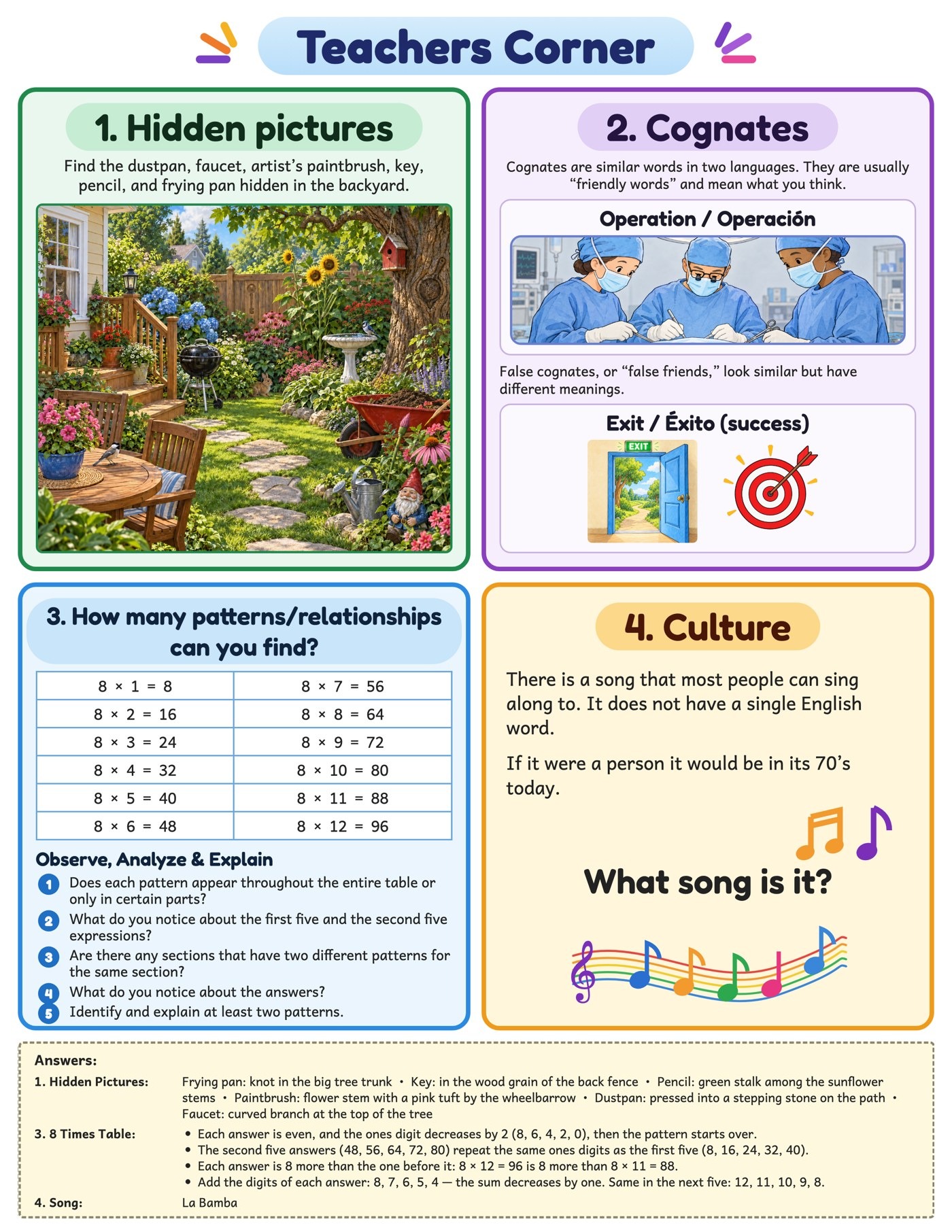
This is the page I ended up with. The pictures were made with ChatGPT’s image generator. The hidden pictures box was the part I enjoyed most, and it seemed like something SIG members might enjoy too. So here is the same idea with a Lowcountry theme.
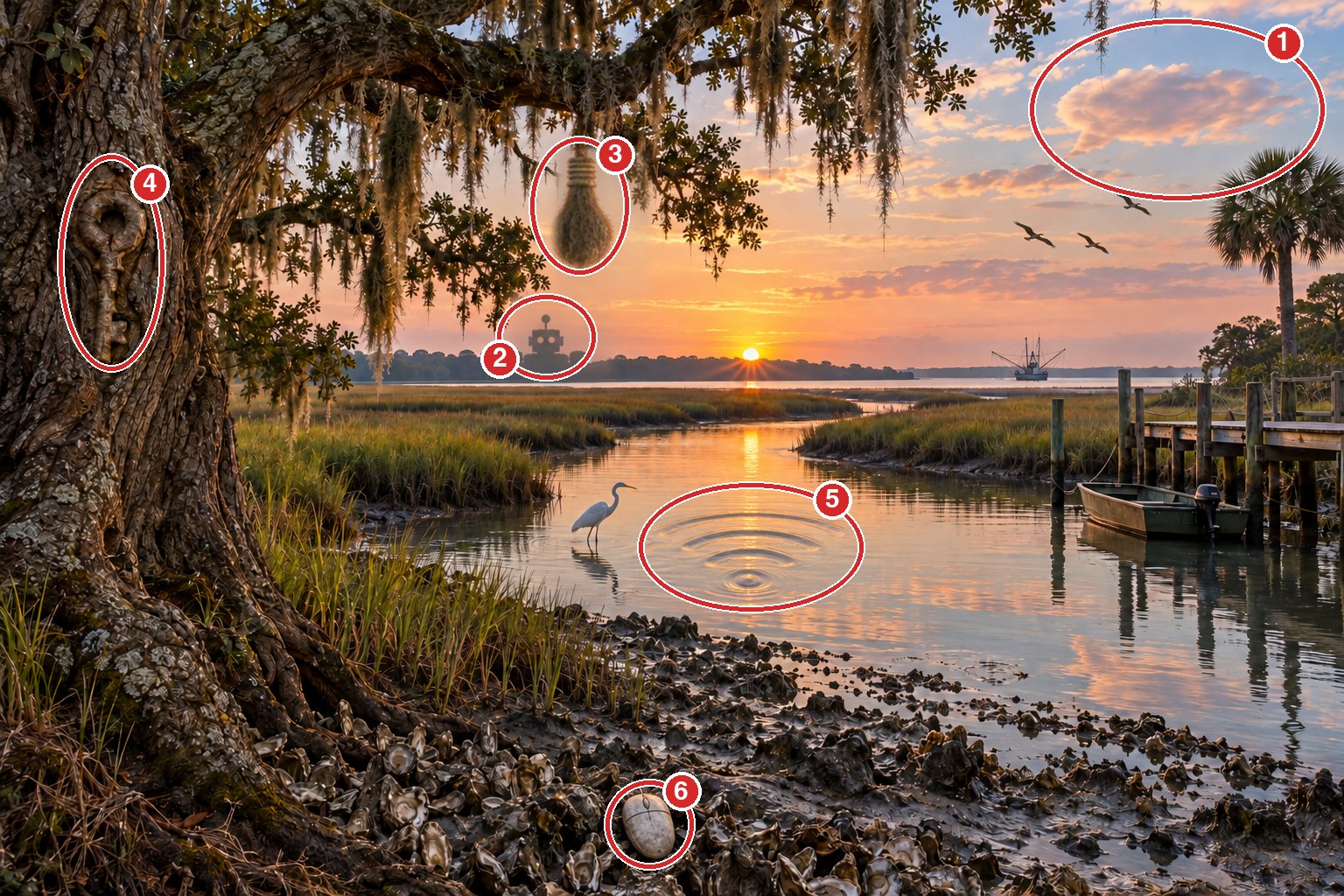
Can you find all six?

Six objects are hidden in this marsh scene: a computer mouse, a key, a light bulb, a robot, a speech bubble and a wifi symbol. Each one is disguised as part of something else, in the same colors as its surroundings.
Stuck? See the answers.
What this shows about AI images today
The marsh scene is not a photograph. I described the scene and the six objects in a few paragraphs, and ChatGPT’s image generator made the picture. It is a good example of how much these tools have improved:
- They follow instructions better. I asked for six specific objects, each disguised as a particular part of the scene. The first try got three of the six right.
- They handle words better. Signs and labels inside a picture, like the “EXIT” sign on the worksheet, now usually come out spelled correctly. Not long ago they were often gibberish.
- They stay consistent from one try to the next. For the objects that missed, I marked those spots and asked for only those areas to be redone. The rest of the picture stayed the same. This is the step that used to be hardest: asking for one small fix often changed everything else.
If you try this yourself, still expect to go back and forth a few times. That back-and-forth is where most of the fun is.
That’s it for Issue 8. Tell us what helped, what confused you, and what you’d like covered next at SCHHCC.AI.SIG@gmail.com.
Until next time,
Ron and Jim
Prepared with AI assistance.