 AI, Plainly
Deep Dive · October 8, 2026
Restoring Family Photos with AI: How Much Is Real?
Some of the photographs in my family archive go back to the 1920s. Many show my grandparents, caught in moments that are now about a century behind us. Time has left its mark on them. Some have faded, some are damaged, and some have faces that are hard to make out.
I’ve been using these photographs to test AI photo restoration. About six months ago I tried running them through AI image models, which are the engines behind tools that create or edit pictures from written instructions. Six months is a long time in AI. OpenAI has since released GPT Image 2.5, nicknamed Sunburst, and Google has released Nano Banana 2.1, so I decided to repeat the experiment.
This time I cared most about the people in the pictures. Could these models improve a damaged photo and still leave the faces alone?
What do we mean by restoration?
The word suggests returning something to its original condition. For a photograph, that could mean correcting faded tones, reducing stains, or repairing scratches. People also use it for much bigger changes, like sharpening a blurry face, giving skin a realistic texture, or adding color to a black-and-white picture.
The most useful distinction I’ve found is between two levels.
- Faithful restoration corrects defects such as fading, scratches, dust, and noise, and improves image quality while keeping the original photographic evidence intact.
- Generative reconstruction uses AI to invent or infer visual information that isn’t reliably there in the original photograph.
No one has settled on standard terms. You’ll also see generative reconstruction called generative restoration or AI-enhanced restoration. When the invented details have no support in the source and change a face, a piece of clothing, or an object, people call it hallucination, which is the AI world’s word for making something up with confidence.
Reconstruction isn’t always unwelcome. Rebuilding a missing corner of a photo can be useful. Just remember that the result is a plausible guess at what was there, and it may not match what the camera actually saw.
This matters even more for historical and family photographs. The Coalition for Responsible AI in Genealogy recommends clearly labeling AI-modified historical images and treating them as illustrations, never as evidence of identity, time, or place [S1].
One AI result often contains both levels, and you usually can’t tell where one stops and the other starts. A photo that looks sharper may be less accurate.
Take a faded face. Some detail may survive as faint differences in tone, and adjusting the contrast can bring it out. A better scan of the original print might even recover information that an earlier digital copy missed.
An eye that has dissolved into a blur is a different story. Many eye shapes could produce that same blur. A model can draw a convincing eye with an eyelid, lashes, and a glint of light, but a convincing eye isn’t necessarily the one that belonged to the person in front of the camera.
When the information is truly gone, neither AI nor a skilled human restorer can recover it from that photograph alone. Other photos may help. Without more evidence, some doubt remains, and a polished result makes the doubt easy to forget.
With family photographs, faces carry the most risk. A slightly different mouth or eye spacing changes a likeness. Smoothing out wrinkles changes how old someone looks. Opening their eyes or shifting a smile changes the expression, and with it how we read the moment.
The test
My test photograph is a faded family snapshot from the 1930s. It shows three adults, two babies, and a girl on a lawn. The man in the middle is my grandfather, the woman on the right is my grandmother, and I believe the infant she is holding is my father. I compared five models: GPT Image 2, GPT Image 2.5 Sunburst, Nano Banana 2.0, Nano Banana 2.1, and Nano Banana Pro.
I cropped the scan down to the photograph itself. Every model got the same instructions. Remove the damage, repair the fading, add period-appropriate color, and preserve every face and feature of the scene.
The color request deliberately invited some invention, because the photo holds no reliable evidence of the original colors. A believable dress color is still a guess. The same dress came out cream, blue, white, or yellow depending on the model and the run.
Each comparison sheet shows one result per model. What I describe also draws on earlier attempts with this print, up to nine per Nano Banana model and three per GPT model, plus a handful of other photographs. I changed the wording a bit between attempts, so the counts below reflect what I saw and are not controlled failure rates.
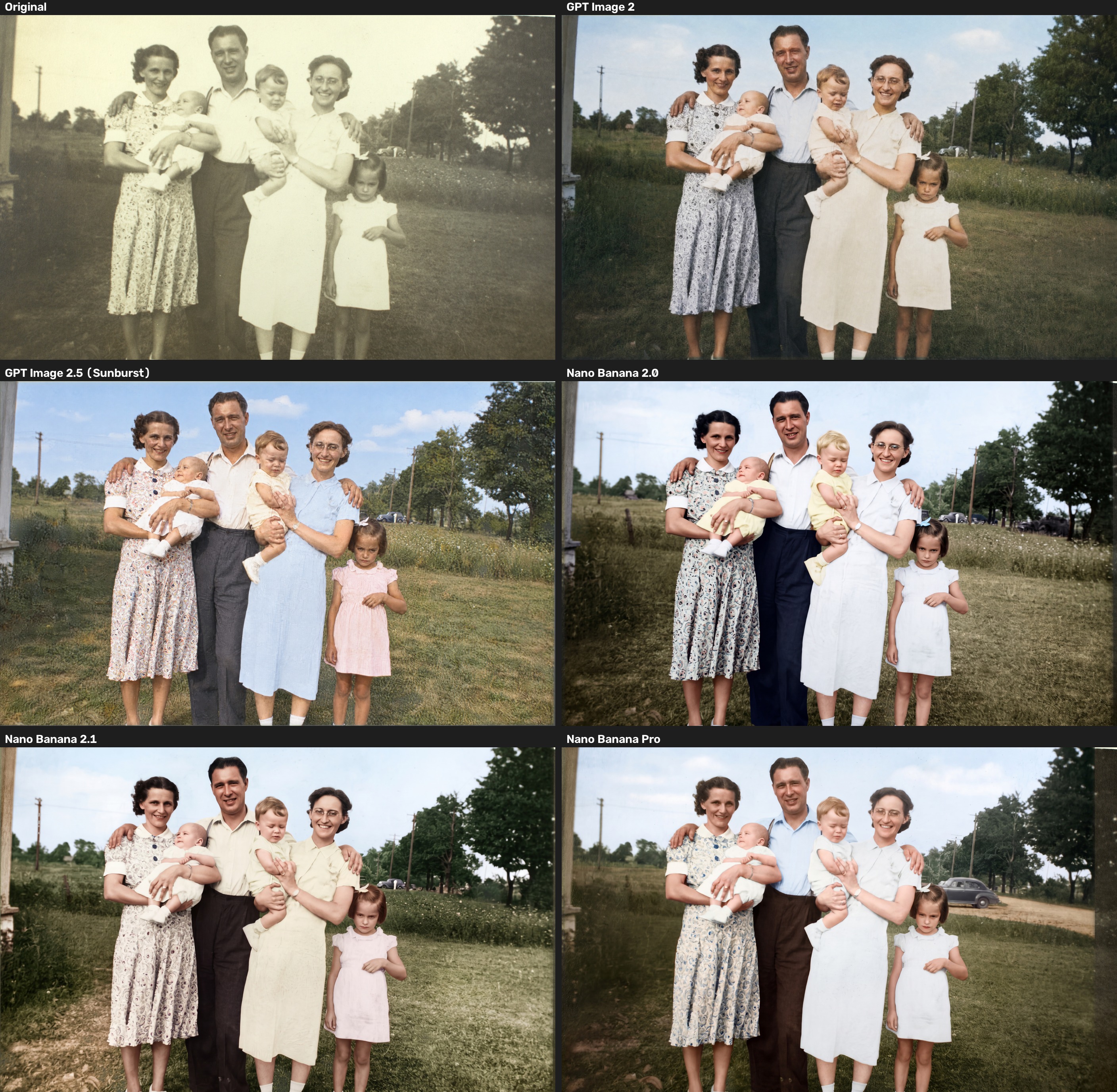
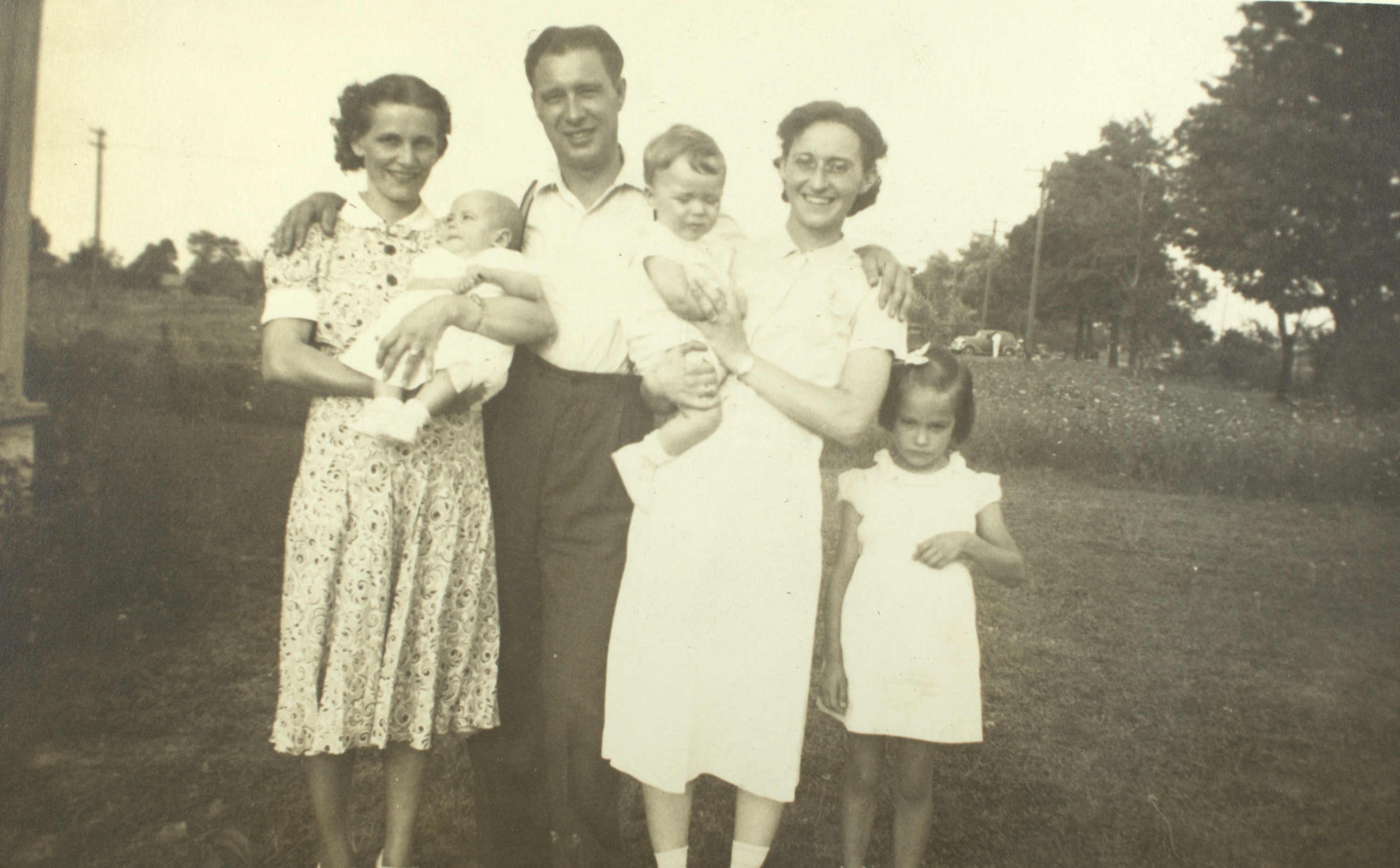
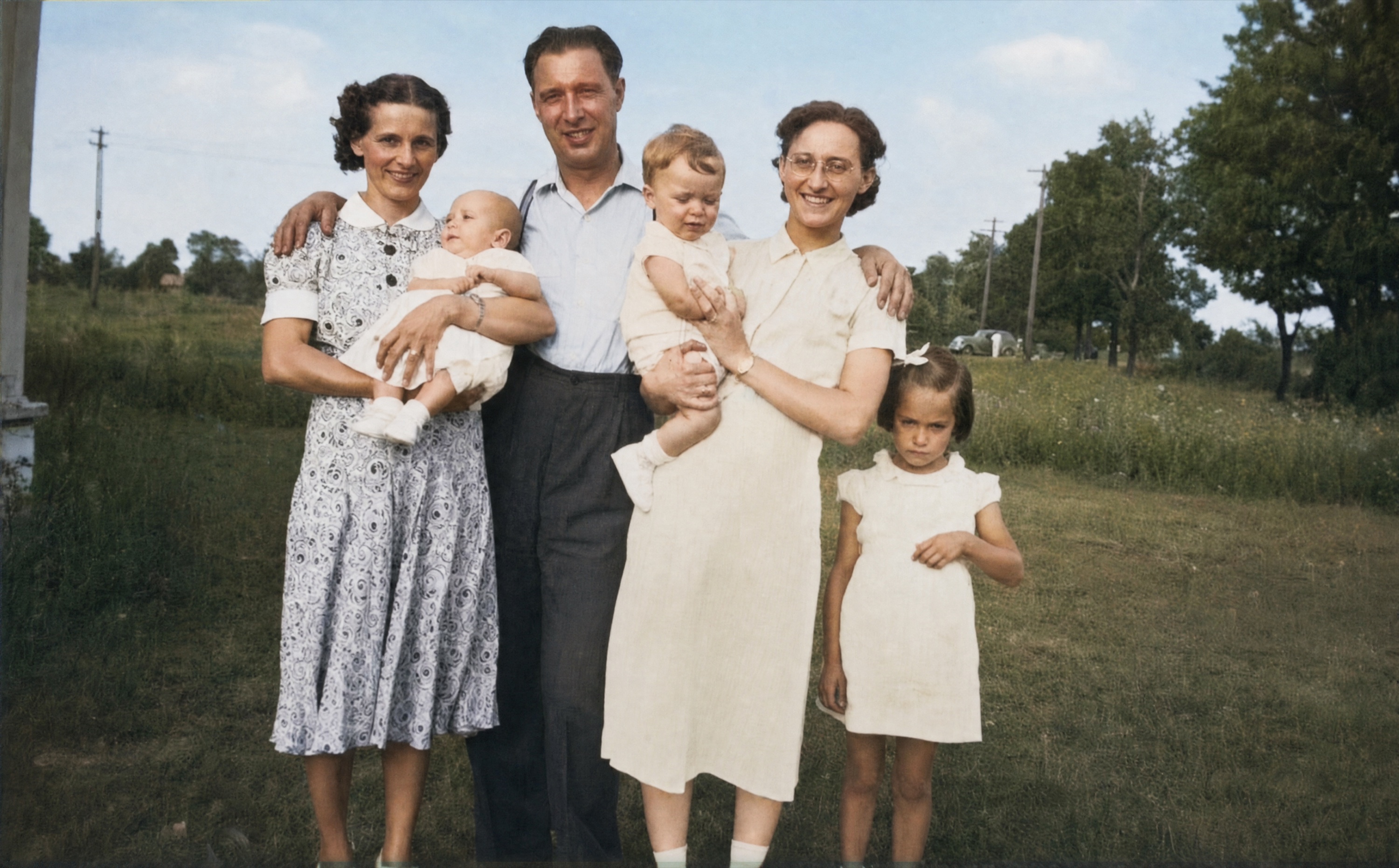
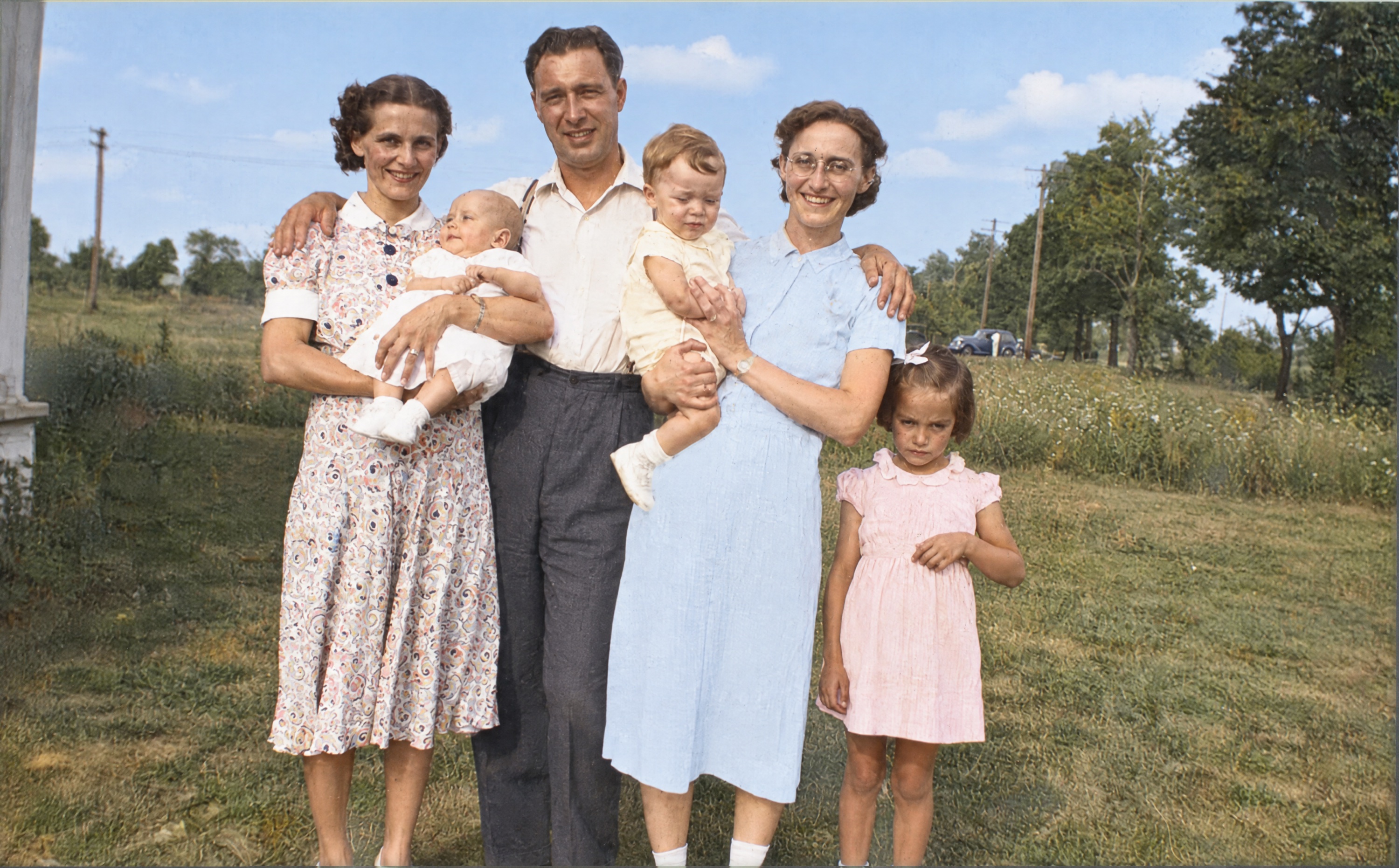
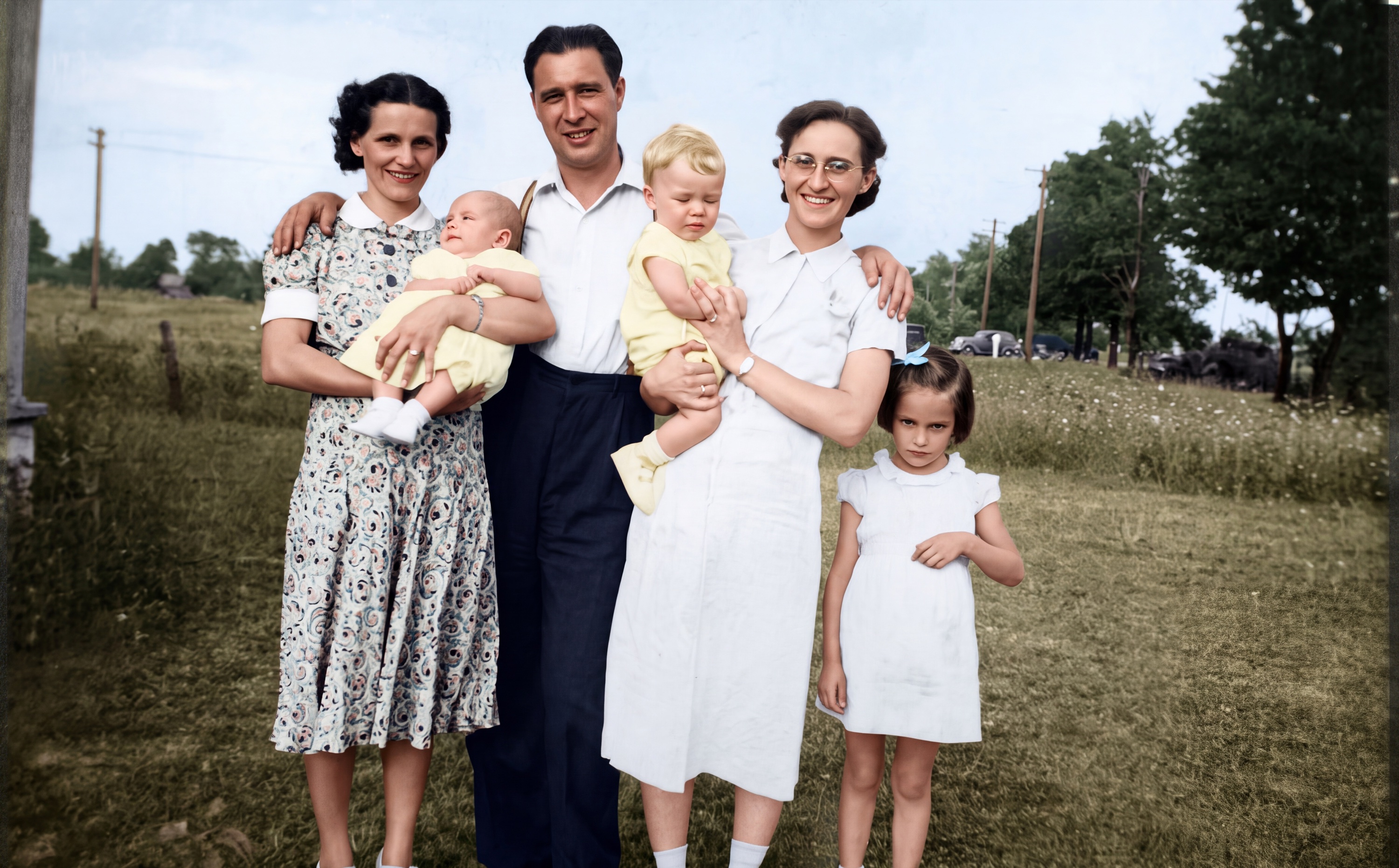
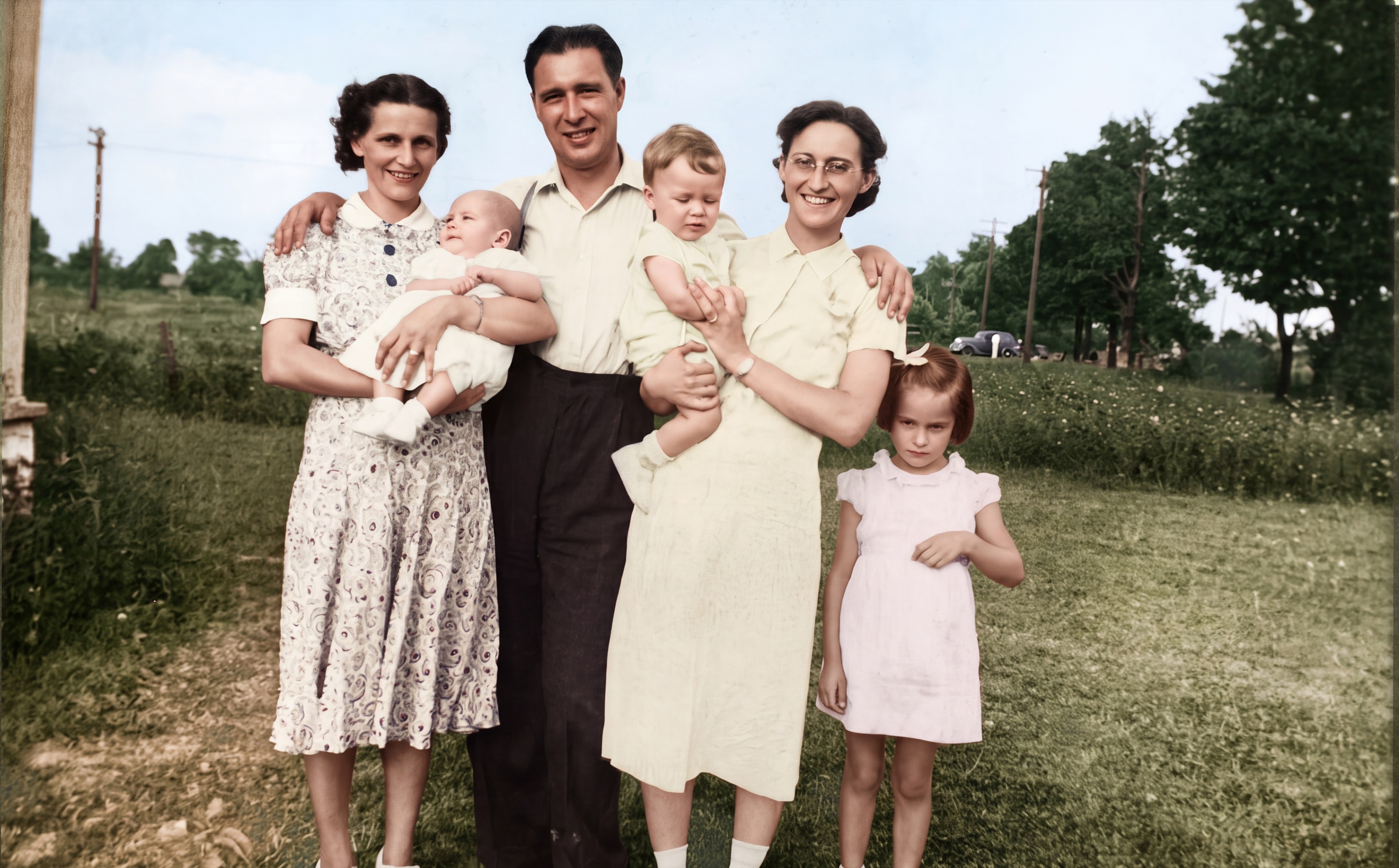
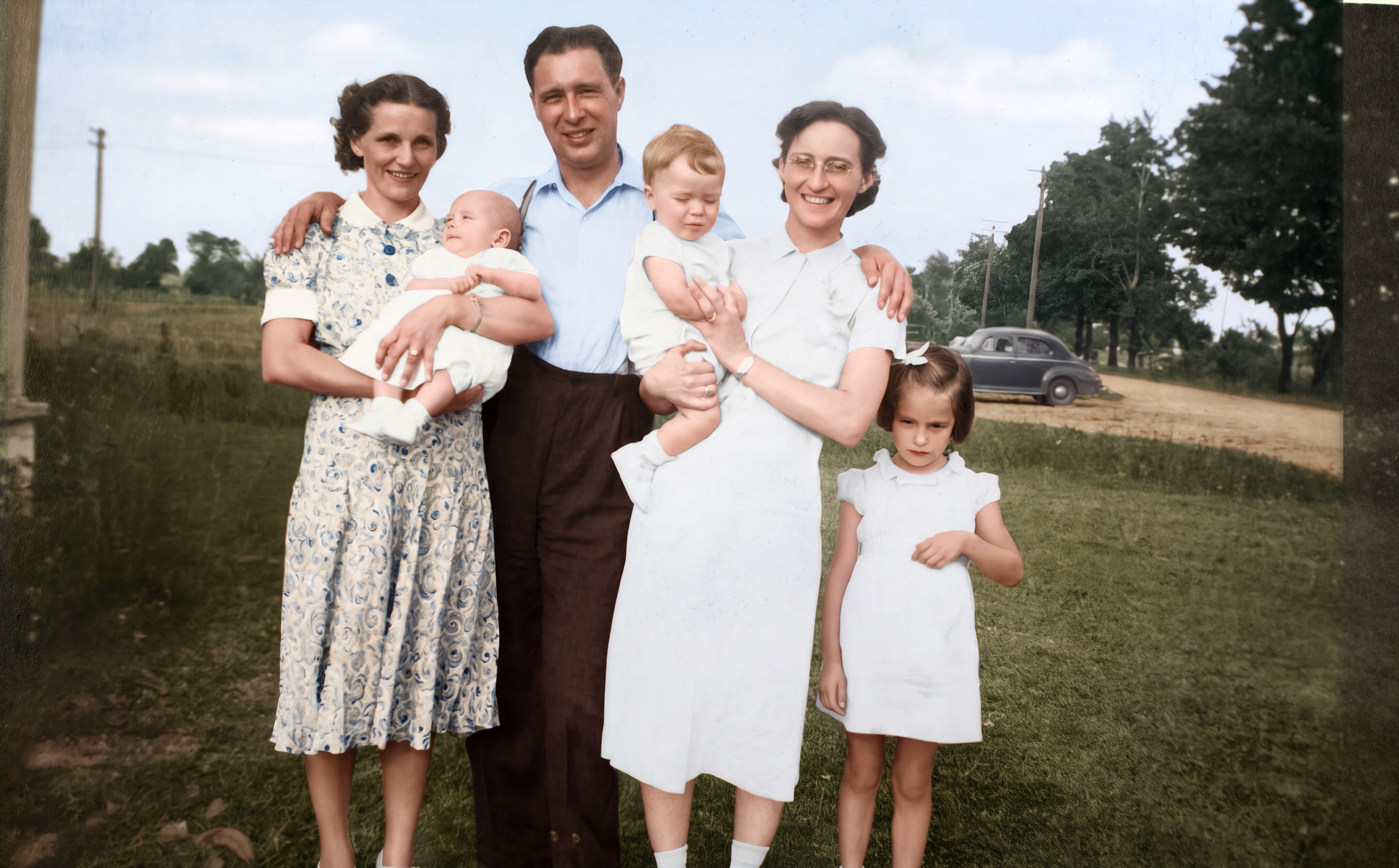
Figure 1. Full-image comparison, left to right and top to bottom. Original, GPT Image 2, GPT Image 2.5 Sunburst, Nano Banana 2.0, Nano Banana 2.1, and Nano Banana Pro. Click any picture to see it larger.
What happened to the scene
GPT Image 2 stayed the most faithful to the whole scene. I found nothing added in its runs on this print. Its colors were restrained, and it kept much of the photograph’s grain and tonal character.
GPT Image 2.5 Sunburst also left the scene alone in the runs I looked at. Its colors were far more vivid, with a strong blue sky and brighter clothing. A bolder picture isn’t a more faithful one.
Nano Banana 2.0 gave me a clean, high-contrast image, but in about six of nine attempts it added small details. I saw a path in the lawn, a fence post, and a dark mass on the horizon. Once it put a bow tie on a woman’s blouse.
Nano Banana 2.1 usually stayed closer to the source, and its color looked softer and more natural. It still invented ground features in roughly two or three of nine attempts, including a large dirt road once.
Nano Banana Pro was the least dependable with this scene. A dirt road showed up across the field in about seven of nine attempts. The result shown here also has a large dark car and a dark band along the right edge. In one other run it rearranged the people.
These additions are easy to miss because they look believable. An old car beside a country road is just what we expect from an old photograph. Nothing in the source supports it.
What happened to the faces
The faces showed subtler changes.
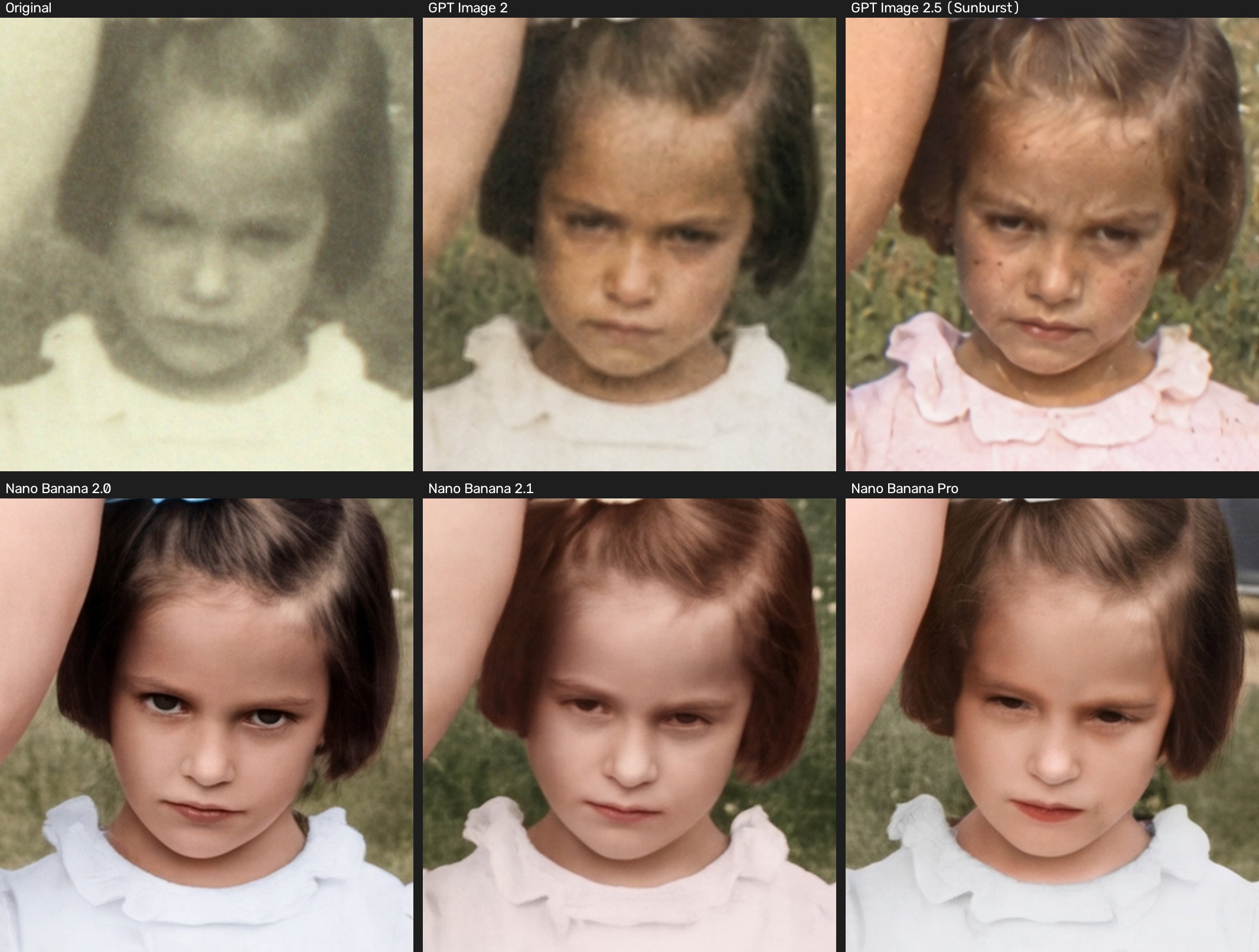
Figure 2. The girl. Top row, original, GPT Image 2, and GPT Image 2.5. Bottom row, Nano Banana 2.0, Nano Banana 2.1, and Nano Banana Pro. Compare the eyelids, the expression, and the skin texture.
In my judgment GPT Image 2 stayed closest to the print. It kept the age, the asymmetry, and the expression, including the girl’s scowl. That restraint had a price. The girl’s face could look dark or muddy, and some dust specks stayed.
GPT Image 2.5 kept the shape and expression of the faces fairly well, but again and again it added skin detail the print doesn’t show. The girl picked up freckle-like dots. My grandmother, the woman with glasses, gained spots on her forehead, cheeks, and neck. My grandfather gained extra creases. All of them looked older and rougher.
I found that useful to learn. Invented detail doesn’t always flatter a face. Sometimes it makes the face look more weathered and more real than the photograph ever showed.
Nano Banana 2.0 did the heaviest retouching. Over repeated attempts it smoothed skin and made people look younger and more glamorous. The girl’s lowered, heavy eyelids turned into wide eyes with dark lashes. The portrait looked polished, but her expression had changed.
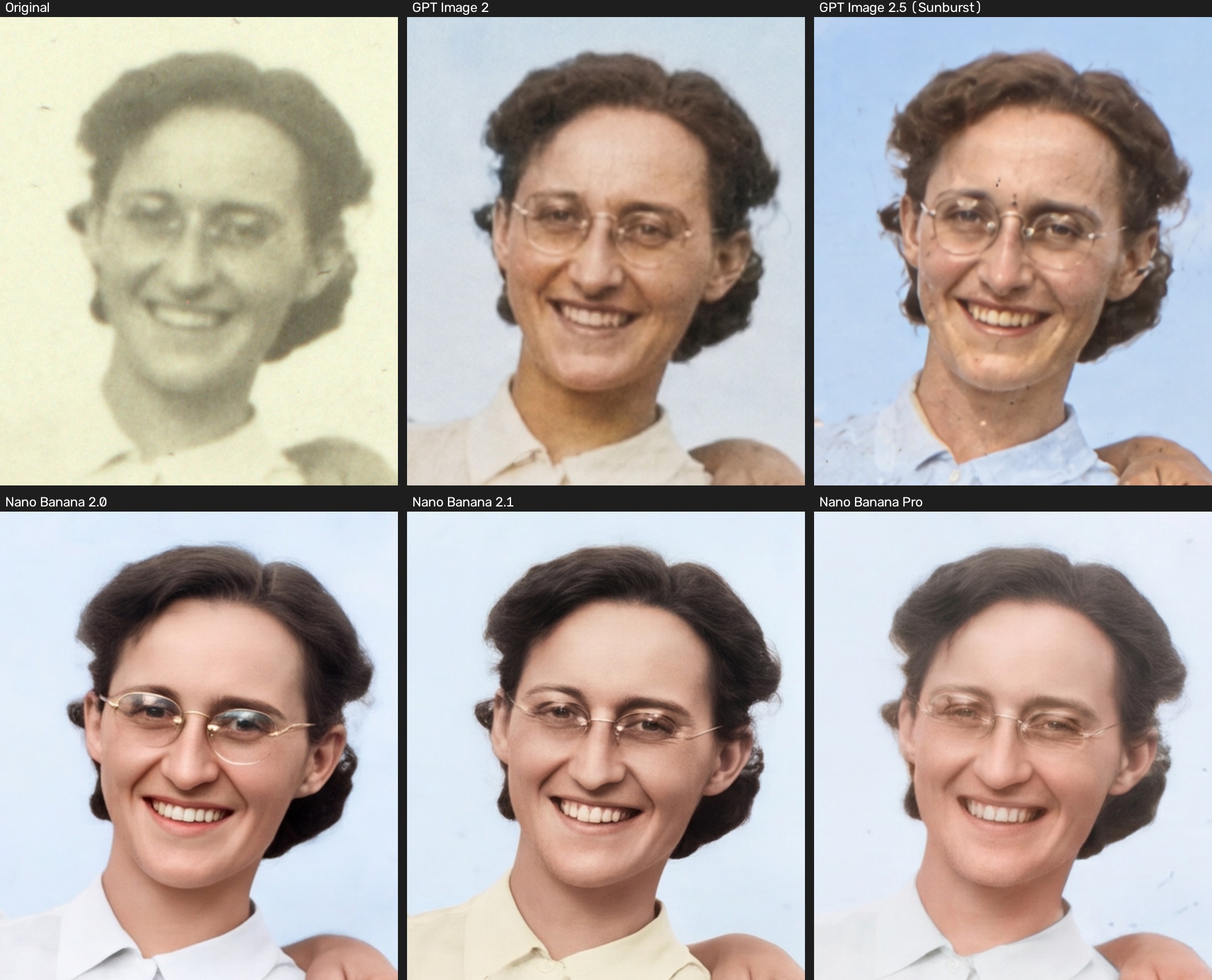
Figure 3. My grandmother, the woman with glasses, in the same order. Compare the frames, the skin texture, and the apparent age.
Nano Banana 2.0 also kept turning thin wire glasses into bolder gold rims. Nano Banana 2.1 smoothed the skin and darkened the hair, brows, and eyes. In one run I reviewed separately, a woman’s glasses nearly vanished. An automated checker flagged a second possible case, but I never confirmed it by eye, so I haven’t counted it.
Nano Banana Pro held on to expressions better than Nano Banana 2.0 and kept the thin glasses, even though it struggled with the scene around the people. Its hair color changed from run to run. In the result shown here the girl has bright red lips, even though my instructions ruled out makeup.
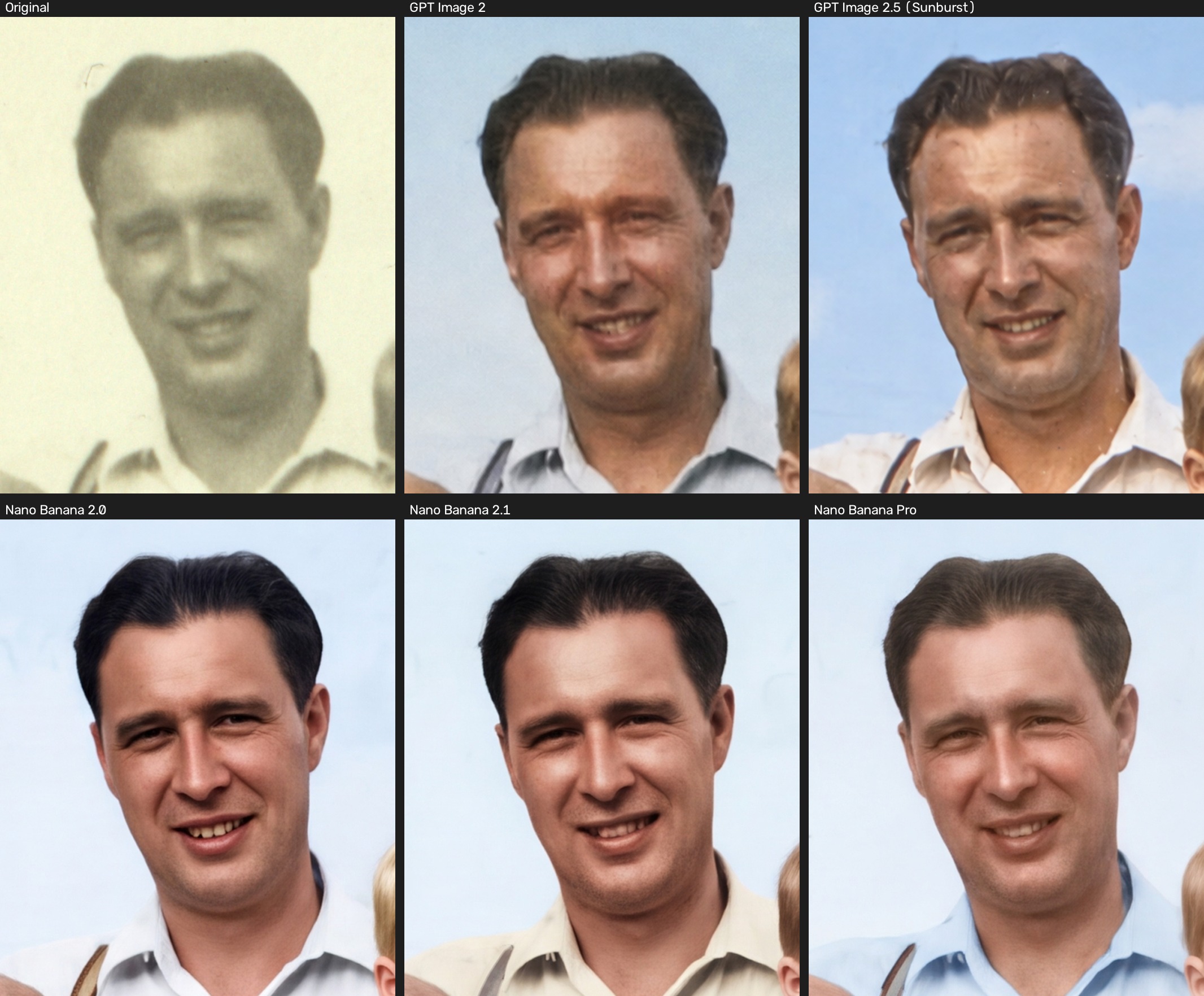
Figure 4. My grandfather. Compare the creases in his face and his mouth. In the Nano Banana 2.0 result shown, a visible gap between the teeth has no clear support in the print. I saw this in one run only.
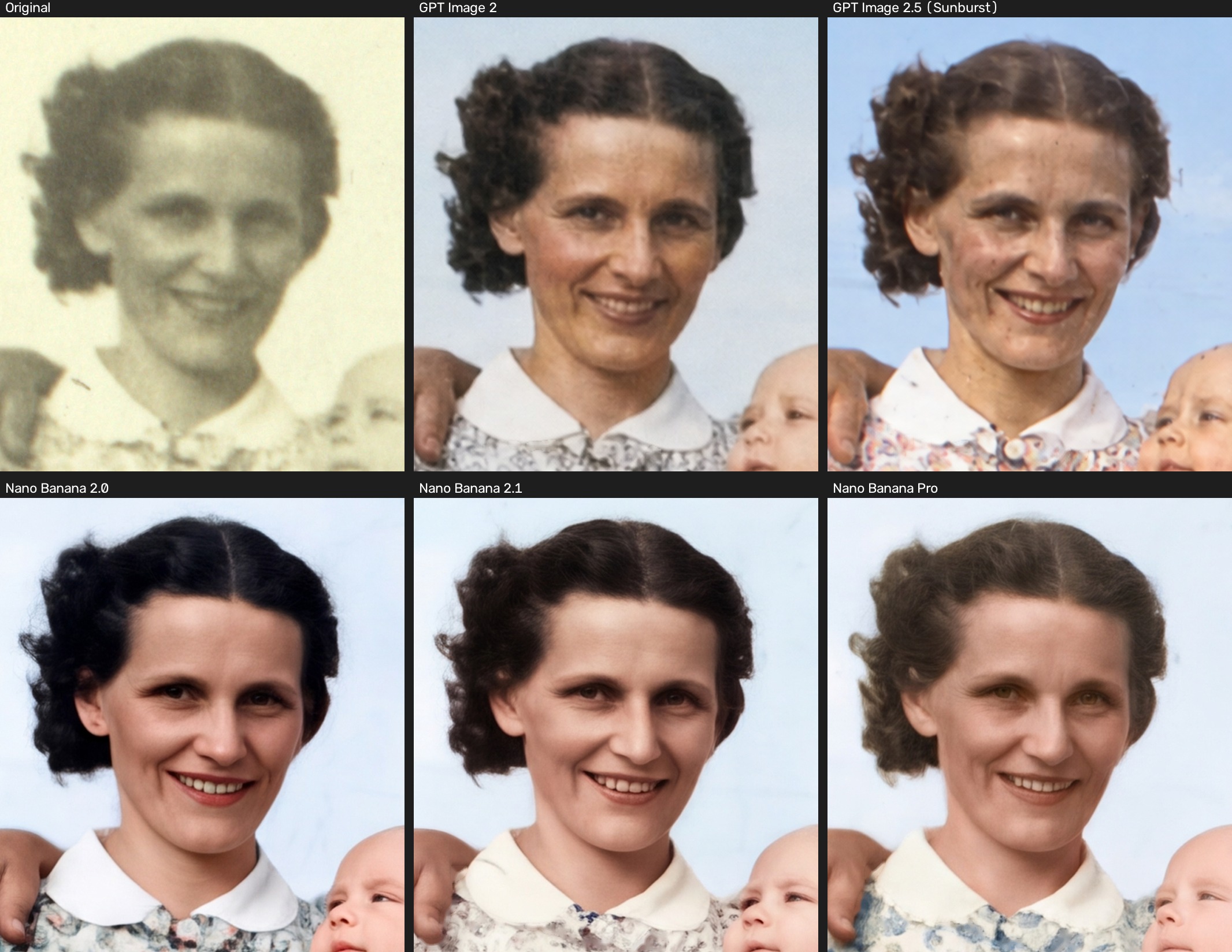
Figure 5. The woman on the left. These crops make the differences in skin smoothing, hair color, and apparent age easier to see.
Can the computer check its own work?
One result surprised me. I ran an automated face-identity check, which is software that decides whether two faces belong to the same person. Nearly every output passed, even some where the eyes had changed or the glasses were gone. A check like that can say two faces match and still miss changes that matter a great deal in a family photograph.
More specific instructions helped with some changes, but they didn’t stop them all. Clear rules about skin smoothing, freckles, and eye shape gave me better control. Telling the model not to add anything to the scene did not reliably keep out the invented roads. A careful prompt states what I want, and I still have to look at what comes back.
Repeating the attempts taught me something too. The same model could change clothing colors, hair color, how much dust it removed, or what appeared in the background from one run to the next. One good-looking result says less than a pattern that holds up across several tries.
What I can and can’t say
This test had a narrow scope. I looked only at the general-purpose frontier AI models, meaning the image generators built into the major AI assistants, and only for photo restoration. I did not review their image abilities in general. I also did not try other approaches, such as dedicated restoration software like Topaz or services built on other image models like FLUX. I may widen the exploration to include those in a follow-up.
Most of what I found comes from one photograph. A few other prints pointed the same way, but that isn’t enough to rank the models for all restoration work. Comparing a result with a faded original also can’t confirm details the original no longer shows. Even my own eyes fooled me once. While reviewing, I mistook a patch of damage for a moustache.
For this print and my priorities, the older GPT Image 2 gave me the best starting point. GPT Image 2.5 kept the scene intact but added facial texture I didn’t want. Nano Banana 2.1 was better than 2.0 at leaving the scene alone in these attempts, though it still changed faces. Nano Banana Pro showed me that how a model handles faces and how it handles the rest of the picture need to be judged separately.
Tips if you try this at home
These come straight from my tests.
- Ask for faithfulness. Here is a prompt to adapt. Instructions help but don’t solve the problem, so treat it as a starting point. “Perform a faithful photographic restoration. Remove damage, correct exposure and color, and improve clarity while preserving the original composition, facial features, expressions, clothing, and objects. Avoid generative reconstruction, invented details, or speculative alterations. Where original details cannot be reliably recovered, prioritize fidelity over apparent sharpness.”
- Keep the original scan untouched. Save restored versions next to it and label how each one was made, as genealogists now recommend [S1].
- Try more than once. Look for patterns that repeat.
- Look closely at the faces. Check the glasses, the eyes, the expression, and the apparent age against the original.
- Check the background too. Roads, fences, and cars can appear from nowhere.
- Treat colors as guesses. The print doesn’t record them.
An enhanced photograph can still be meaningful and enjoyable. Colorizing or reconstructing a picture can help us feel close to an ancestor, as long as we know what we’re looking at. In my own archive the unedited scan stays the reference, and the restored versions sit beside it.
What I value most in these tools is restraint. I want my grandparents easier to see, and I want to keep what the photograph really tells us about them.
Have you tried restoring your own family photos, or would you like to? Bring a print or your questions to a future AI SIG session.
Sources
- [S1] Coalition for Responsible AI in Genealogy, “Protecting Trust in Historical Images” (official statement, November 4, 2025): https://craigen.org/protecting-trust-in-historical-images/